

Modern IT Infrastructure Services vs. Traditional Systems — Which Serves Small Businesses Best?
Technology moves fast, and small businesses face a practical choice: modernize their IT or keep running on familiar, traditional systems. This article breaks down both approaches—what they are, how they differ, and what each means for scalability, cost, and security. You’ll get clear, actionable insight on modern infrastructure, the limits of legacy setups, cost trade-offs, migration steps, and when to bring in outside IT expertise.
What is modern IT infrastructure, and which parts matter most?
Modern IT infrastructure is the mix of tools and platforms that deliver IT services with agility and scale. It leans on cloud platforms, virtualization, and automation to speed deployment and cut operational friction. The core pieces are chosen to scale quickly, adapt as needs change, and reduce the time IT teams spend on routine maintenance.
How does cloud computing shape modern IT infrastructure?

Cloud computing is central to modern IT. It delivers compute, storage, and services over the internet so you can scale capacity up or down as demand fluctuates. That flexibility often cuts upfront hardware costs and shifts spending to a predictable, pay-as-you-go model. Providers like AWS, Microsoft Azure, and Google Cloud offer options specifically suited to small businesses, from managed services to simple hosting.
What roles do virtualization, automation, and hyperconverged infrastructure play?
Virtualization lets many virtual machines run on a single server, improving utilization and lowering hardware needs. Automation removes repetitive tasks—patching, provisioning, backups—so teams can focus on projects that drive value. Hyperconverged infrastructure combines compute, storage, and networking to simplify operations and scale more smoothly. Together, these technologies let small businesses move faster and operate with fewer resources.
What characterizes traditional IT systems, and what challenges do they bring?
Traditional IT typically means on-premise data centers and legacy applications reliant on physical hardware. While familiar and stable, these systems often demand more upkeep, are harder to scale, and can be costly to expand or integrate with newer services.
How do on-premise data centers and legacy systems operate?
On-premise data centers host servers and storage on-site, and legacy applications are often tied to specific hardware or older platforms. These systems tend to run in silos, which makes integration with modern cloud services difficult and increases operational overhead. As businesses grow, those constraints can slow expansion and create management headaches.
What common challenges do small businesses face with traditional IT?
Small businesses using traditional IT commonly run into high maintenance bills, limited scalability, and security gaps. Keeping hardware current and software patched consumes budget and staff time. When the business needs to scale quickly, legacy setups can be a bottleneck. And without modern security controls, legacy systems can expose organizations to breaches and compliance risk.
What are the practical benefits of modern IT for small businesses?
Modern IT brings concrete advantages: easier scaling, greater flexibility, and often lower ongoing cloud cost management. Cloud and automation let teams respond faster to opportunities while reducing the time spent on routine operations.
How does modern IT improve scalability, flexibility, and cost-effectiveness?
With modern infrastructure, capacity grows with demand. Cloud services let you right-size resources in real time so you avoid over-provisioning. That pay-as-you-go model typically lowers initial capital outlay and makes budgets more predictable—important for small businesses watching cash flow.
How does modern IT strengthen security and disaster recovery?
Modern solutions build in stronger security controls—encryption, multi-factor authentication, continuous monitoring—and deliver frequent updates. Disaster recovery is also more resilient: automated backups and geographically distributed datacenters reduce downtime and speed recovery. These features support business continuity and help meet compliance requirements.
How do modern and traditional IT systems compare on cost and performance?
Cost and performance are key when choosing infrastructure. Modern IT often wins on total cost of ownership because it reduces maintenance and scales on demand, while delivering better performance for contemporary workloads.
What is the total cost of ownership: OpEx vs. CapEx models?
Traditional systems usually require capital expenditure—buying servers and network gear up front—which ties up cash and can create unpredictable refresh cycles. Modern IT shifts spending toward operational expenditure: you pay for resources as you use them, smoothing cash flow and making future planning easier.
How do performance and reliability differ between the two systems?
Modern infrastructure typically provides better performance for modern applications because it can tap elastic cloud resources and platform services. Traditional setups may be stable but can struggle under modern loads, leading to slower response times and potential downtime. Cloud services also back reliability with service-level agreements, redundancy, and managed support that many small organizations find hard to replicate on-premise.
What practical steps should small businesses take to move to modern IT?
Moving to modern IT takes planning. Start with a clear assessment, identify priorities, and build a migration plan that minimizes disruption.
How can small businesses plan and execute cloud migration successfully?
Begin with an inventory of applications and data to determine what’s cloud-ready. Map out a migration timeline, assign responsibilities, and surface risks up front. Pilot migrations for non-critical workloads, validate performance and security, then expand. Partnering with experienced cloud migration specialists can reduce surprises and keep the transition smooth.
What are the advantages and considerations of hybrid cloud infrastructure?
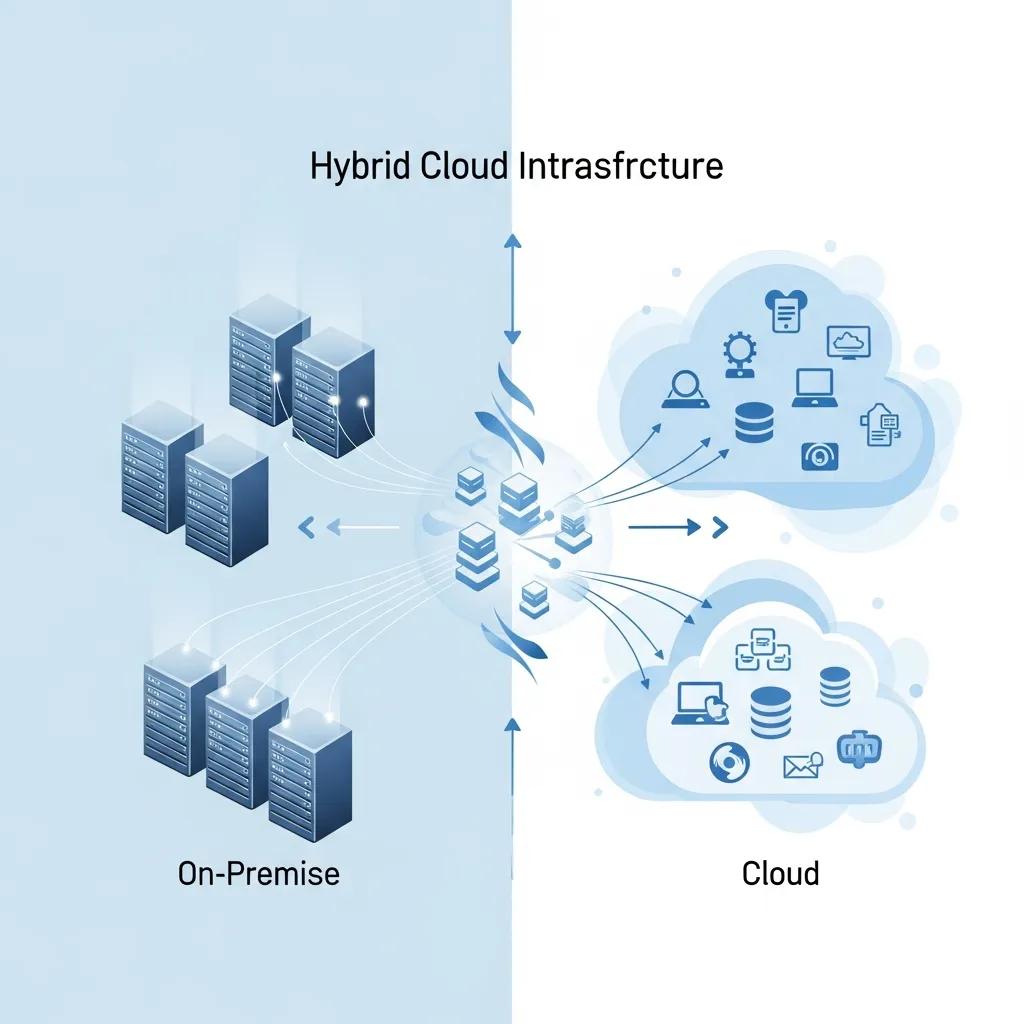
Hybrid cloud mixes on-premise and cloud resources so businesses can keep sensitive data in-house while leveraging the cloud for scale. It’s a practical middle ground, but it requires careful integration, consistent security policies, and monitoring to ensure both environments work together reliably.
Why is IT consultation and strategic leadership critical when choosing infrastructure?
Good strategic guidance helps small businesses pick the right mix of systems and avoid costly mistakes. IT consultants bring planning discipline, migration experience, and a view of best practices shaped by multiple implementations.
How do vCIO and vCTO services support small business IT modernization?
vCIO and vCTO services provide strategic, part-time leadership—technology roadmaps, vendor selection, budgeting, and risk management—without the overhead of a full-time executive. They help align IT investments with business goals and ensure technology choices scale with the company.
What should small businesses evaluate when choosing IT partners?
Look for partners with practical experience in your industry, a track record of successful migrations, and clear, ongoing support plans. Ask how they handle security, compliance, and training, and check references to confirm they deliver on promises and stay current with evolving technologies.
| System | Characteristic | Level |
|---|---|---|
| Modern IT Infrastructure | Scalability | High |
| Traditional IT Systems | Maintenance Costs | High |
| Cloud Computing | Flexibility | High |
This quick comparison highlights core differences—modern solutions excel at scalability and flexibility, while traditional setups tend to carry higher maintenance burdens.
For small businesses, modern IT infrastructure often delivers better agility and lower ongoing overhead. By weighing the trade-offs and planning carefully, organizations can choose the path that best supports their growth and resilience.
Frequently Asked Questions
What factors should small businesses consider when choosing between modern and traditional IT systems?
When choosing between modern and traditional IT systems, small businesses should consider factors such as scalability, cost, security, and maintenance requirements. Modern systems typically offer greater flexibility and lower ongoing costs, while traditional systems may have higher maintenance burdens. Additionally, businesses should evaluate their specific operational needs, the potential for future growth, and the technical skills of their staff to ensure they select a solution that aligns with their long-term goals.
How can small businesses measure the success of their IT infrastructure transition?
To measure the success of an IT infrastructure transition, small businesses should establish key performance indicators (KPIs) such as system uptime, response times, cost savings, and user satisfaction. Regularly reviewing these metrics can help assess whether the new infrastructure meets operational needs and delivers expected benefits. Additionally, gathering feedback from employees on usability and productivity can provide insights into the effectiveness of the transition and highlight areas for further improvement.
What are the common pitfalls small businesses face during IT migration?
Common pitfalls during IT migration include inadequate planning, underestimating the complexity of the transition, and failing to involve key stakeholders. Small businesses may also overlook the importance of data security during migration, leading to potential breaches. Additionally, not providing sufficient training for staff can result in low adoption rates of new systems. To avoid these issues, businesses should develop a comprehensive migration strategy, engage experienced partners, and prioritize communication and training throughout the process.
How does the choice of IT infrastructure impact customer experience?
The choice of IT infrastructure significantly impacts customer experience by influencing service delivery speed, reliability, and security. Modern IT systems, with their scalability and flexibility, can enhance responsiveness to customer needs and provide seamless interactions. In contrast, traditional systems may lead to slower response times and potential downtime, negatively affecting customer satisfaction. By investing in modern infrastructure, small businesses can improve their overall service quality and foster stronger customer relationships.
What role does data management play in modern IT infrastructure?
Data management is crucial in modern IT infrastructure as it ensures that data is organized, accessible, and secure. Effective data management practices enable businesses to leverage analytics for informed decision-making, enhance operational efficiency, and comply with regulatory requirements. Modern IT solutions often include advanced data management tools that facilitate real-time data processing and storage, allowing small businesses to respond quickly to market changes and customer demands while maintaining data integrity and security.
What are the implications of cloud vendor lock-in for small businesses?
Cloud vendor lock-in occurs when a business becomes dependent on a specific cloud provider’s services, making it difficult to switch vendors without incurring significant costs or disruptions. For small businesses, this can limit flexibility and increase long-term expenses. To mitigate this risk, businesses should consider multi-cloud strategies, which involve using services from multiple providers, and ensure that their applications are designed for portability. This approach can enhance resilience and provide leverage in negotiations with cloud vendors.
What are the main differences in security features between modern and traditional IT systems?
Modern systems include up-to-date defenses—encryption, multi-factor authentication, continuous monitoring, and rapid patching—designed for today’s threat landscape. Traditional systems often run older security models that may not protect against modern attacks, increasing the risk of breaches and compliance problems.
How can small businesses assess their readiness for transitioning to modern IT infrastructure?
Assess readiness by auditing current hardware, software, and processes to identify pain points like scaling limits or high maintenance costs. Evaluate staff skills and training needs, and consider a phased migration plan. An external consultant can provide an objective readiness assessment and recommend next steps.
What role does employee training play in implementing modern IT solutions?
Training is essential. When staff understand new tools and workflows, adoption goes smoother and productivity improves. Ongoing training reduces resistance to change and ensures teams get the most value from modern systems.
What are the risks of not transitioning to modern IT infrastructure?
Staying on legacy systems can lead to higher operating costs, security vulnerabilities, limited scalability, and missed business opportunities. Over time, outdated technology can hinder growth and make it harder to compete.
How can small businesses ensure a smooth transition to hybrid cloud infrastructure?
Start with a clear strategy that defines which workloads stay on-premise and which move to the cloud. Use proven integration patterns, enforce consistent security policies, and work with experienced partners to handle the technical complexity. Prioritize training and phased rollouts to minimize disruption.
What are the long-term benefits of adopting modern IT infrastructure for small businesses?
Long-term benefits include easier scaling, improved operational efficiency, and lower recurring costs. Modern systems also provide stronger network security and disaster recovery, helping businesses stay resilient and competitive as they grow.
Conclusion
Modern IT infrastructure gives small businesses practical tools to scale, control costs, and improve security. Understanding the trade-offs between modern and traditional systems helps leaders choose the right path for growth. If you’re evaluating a move, expert IT consultation can speed planning and reduce risk. Ready to get started? Explore our IT consultation services to find the right next step for your business.